Capture without filing
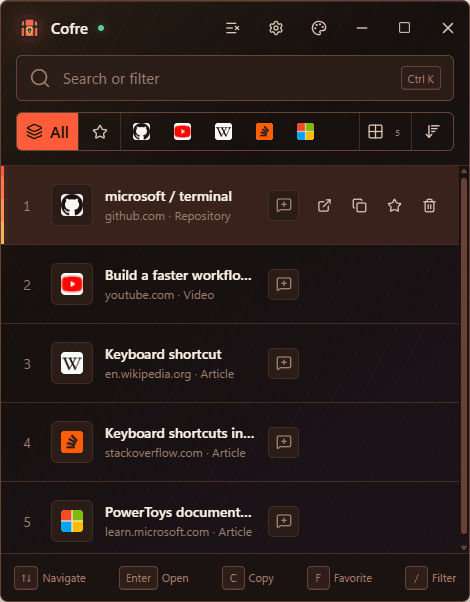
Copying a URL is the save action. Cofre classifies the domain after capture so the user does not have to choose a folder first.
Windows desktop product · Local link management
A compact Windows app that turns one familiar action, copying a URL, into a private link library organized for retrieval instead of filing.
01
Saving a link often interrupts the reason it was worth saving: choose a folder, name it, and decide where it belongs before returning to the original task.
Cofre removes that decision from capture. A copied web URL is saved, classified by website, enriched with useful metadata, and made available through one search field.
02
03 / Product interaction
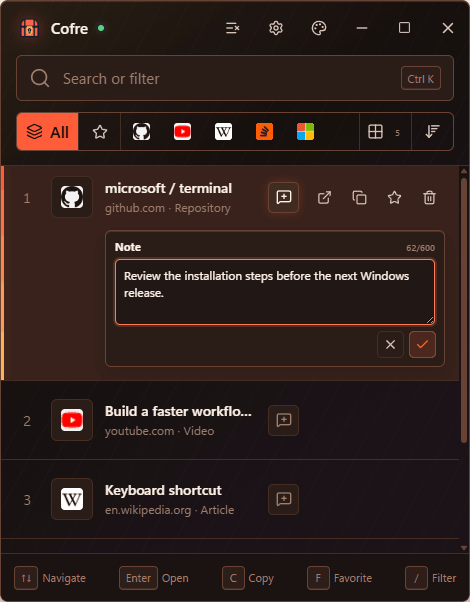
A compact note bubble expands inside the selected link only when it is needed. Notes persist locally, travel in backups, and participate in the same search as link metadata.
04
Copying a URL is the save action. Cofre classifies the domain after capture so the user does not have to choose a folder first.
Titles, complete URLs, websites, content types, favorites, and personal notes share one search surface.
SQLite keeps the library on the device, while versioned JSON backups provide explicit portability without requiring an account.
Tauri provides clipboard monitoring, system tray behavior, autostart, notifications, single-instance recovery, and an NSIS installer.
05 / Windows behavior
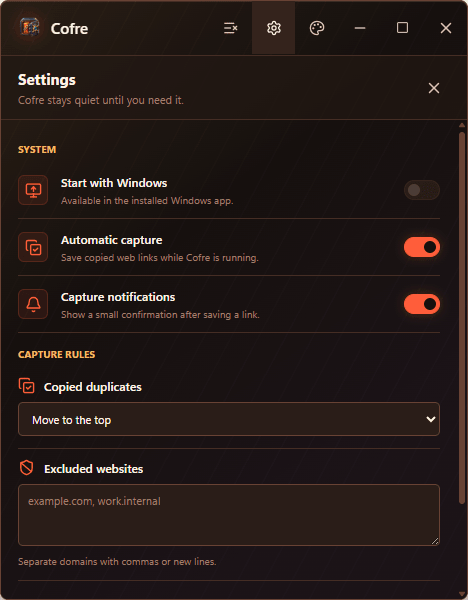
Cofre can remain in the system tray, capture automatically, show a compact confirmation, exclude selected domains, and optionally start with Windows. Duplicate behavior and motion remain user-controlled.
06
The release was tested as an installed Windows application, including clipboard capture, duplicate notifications, search, minimize, maximize and restore, close-to-tray recovery, single-instance launch, upgrade preservation, and autostart path repair.
07
Cofre demonstrates product judgment beyond the browser: a focused workflow, local data ownership, native Windows integration, schema migration, packaging, and evidence-backed release testing.